
Products Introduction
Content Introduction
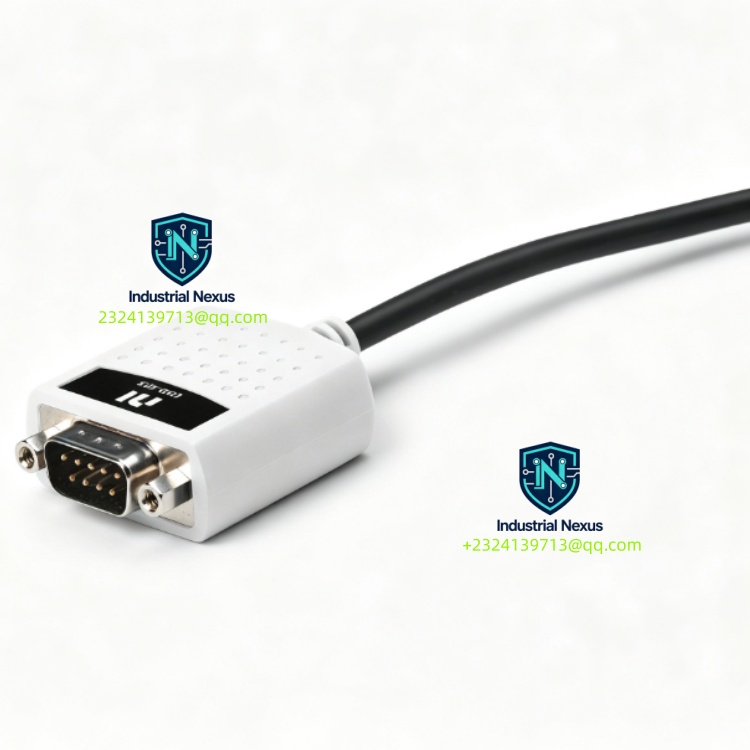
The NI USB-485 is a compact bus-powered USB serial communication adapter that converts a computer USB port into one asynchronous RS485/RS422 serial channel. It supports RTS/CTS hardware handshaking and is recognized by the operating system as a standard COM port, ensuring broad compatibility with legacy serial software and industrial instruments. It is widely used for connecting sensors, actuators, PLCs and test equipment in industrial automation, bench measurement systems, portable test setups and spare replacement of NI serial communication platforms.
Product Details
The USB-485 is a single-port variant of the NI USB RS485 serial family, different from USB-485/2 and USB-485/4 multi-port versions. It comes with an integrated 2-meter cable and a 9-pin D-SUB connector on the serial end. It draws power directly from the USB bus without an external power supply. It works with NI-Serial driver software for port configuration, baud rate setting and communication debugging. This device is still active in the product lifecycle and frequently supplied for maintenance and new industrial test projects.
Product Parameters
Part Number: 778475-01
Serial Channels: 1 channel
Supported Protocols: RS485, RS422
Max Baud Rate: 460.8 kbps
Interface: USB 2.0
Serial Connector: 9-pin D-SUB
Isolation: Non-isolated
Power Supply: USB bus-powered
Software Driver: NI-Serial
Operating Temperature: 0 ℃ to 50 ℃
Storage Temperature: -40 ℃ to 70 ℃
Operating Humidity: 10% to 90% non-condensing
Tags: NI USB-485 USB-485 serial adapter USB to RS485 converter
Reliance Electric 57407 AutoMa
Reliance Electric 57406 AutoMa
Reliance Electric 57405 AutoMa
Reliance Electric 57402 115V A